> For the complete documentation index, see [llms.txt](https://verify-doc.tiller-verify.com/llms.txt). Markdown versions of documentation pages are available by appending `.md` to page URLs; this page is available as [Markdown](https://verify-doc.tiller-verify.com/training-hub/user-guides/account-settings/general/data-retention.md).
# Data Retention
## Dpo Details
The DPO officer information provided during the initial stages of your engagement can be found in the DPO section. In the event that any changes need to be made to the DPO officer's details, you can update the details directly within your account, avoiding the need to contact us.
## Data Retention
The **Data retention settings** enable administrators to control how long client data is retained and determine when it will be archived or permanently deleted. By default, client data is retained for **8 weeks**. During this period:
* **Auto-Archiving**: Applications are automatically archived after **6 weeks** (42 days).
* **Permanent Deletion**: Archived data is permanently deleted after an additional **2 weeks** (56 days total).
These settings are essential to ensure your platform complies with data protection regulations while securely managing sensitive client information. You can configure the data retention settings according to your business requirements.
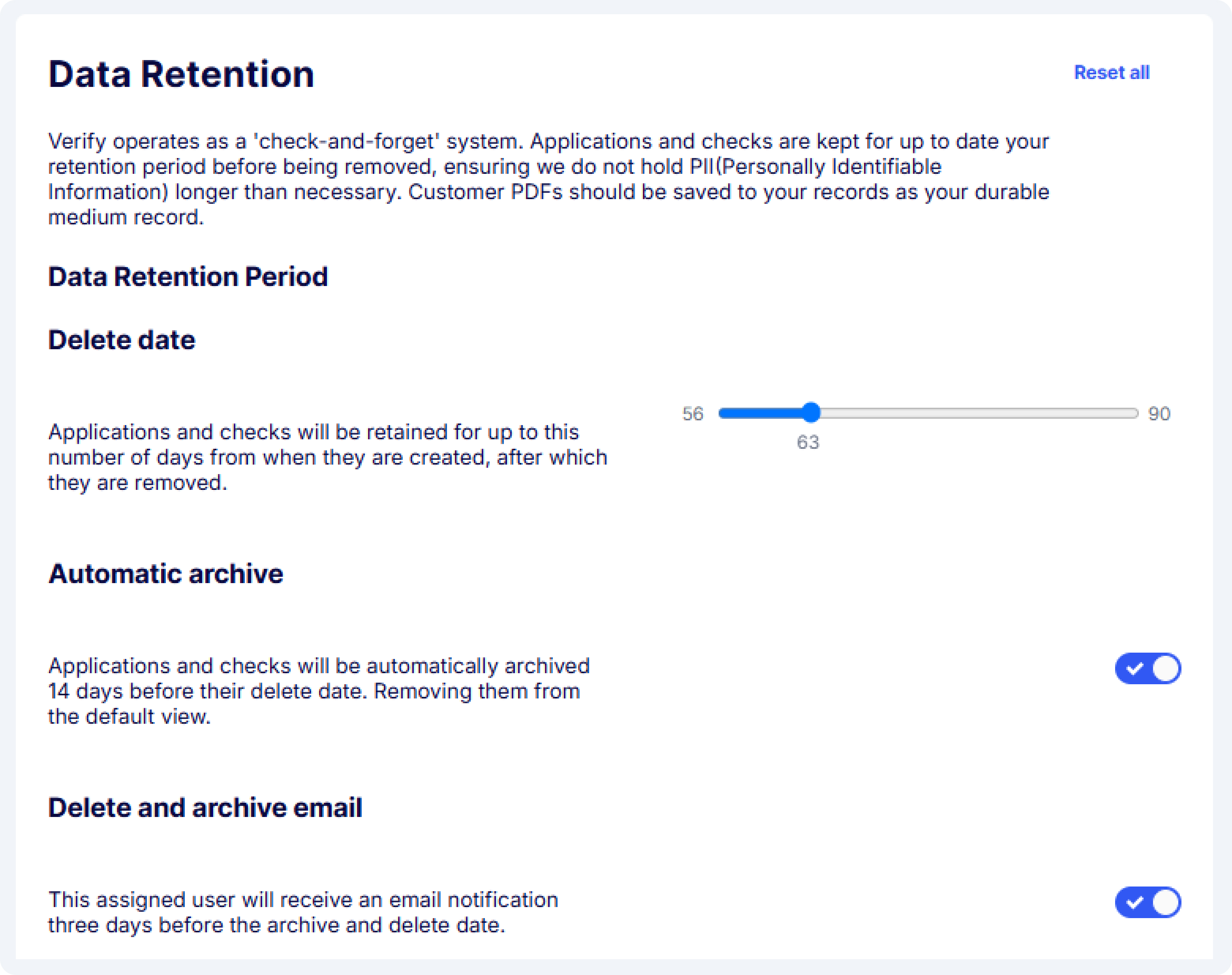
Configure the data retention settings
**Steps to configure data retention settings**
1. **Delete date:** As an admin, you can define the period for which the data will be retained. You can choose a retention period anywhere between **56 days (8 weeks)** and **90 days**. This determines how long data associated with applications will be stored before it is eligible for deletion.
2. **Automatic archive:** You have the option to enable automatic archiving of applications. When this option is selected, all applications will be archived **14 days before the deletion date**. Archiving allows you to retain a record of the data without keeping it in the active system.
3. **Delete and archive email:** With this setting enabled, users assigned to applications or check records will receive an email notification **three days prior to the archive or delete action**. This helps ensure that user is informed before data is archived or deleted, giving them the opportunity to take action if necessary.
---
# Agent Instructions
This documentation is published with GitBook. GitBook is the documentation platform designed so that both humans and AI agents can read, navigate, and reason over technical content effectively. Learn more at gitbook.com.
## Querying This Documentation
If you need additional information that is not directly available in this page, you can query the documentation dynamically by asking a question.
Perform an HTTP GET request on the current page URL with the `ask` query parameter, and the optional `goal` query parameter:
```
GET https://verify-doc.tiller-verify.com/training-hub/user-guides/account-settings/general/data-retention.md?ask=&goal=
```
`ask` is the immediate question: it should be specific, self-contained, and written in natural language.
`goal` is optional and describes the broader end goal you are ultimately trying to accomplish on behalf of the user. GitBook uses it to tailor the answer towards what is most useful for that goal.
The response will contain a direct answer to the question and relevant excerpts and sources from the documentation.
Use this mechanism when the answer is not explicitly present in the current page, you need clarification or additional context, or you want to retrieve related documentation sections.