# Managing Applications

## Application Views

Manage the progress of your applications from the applications screen: <img src="/files/aAeWSUc1SdM2C2Op9eM8" alt="" data-size="line">

{% embed url="<https://vimeo.com/919616679>" fullWidth="true" %}
Application overview
{% endembed %}

The applications can be viewed in either a card or table view:

<img src="/files/Tkk3bQPVmkR46dN7NDK8" alt="" data-size="original">

Within these views, each application will have a status.

New >> In Progress >> In Review >> Completed / Rejected

<table><thead><tr><th width="192">Application Status</th><th>Description</th></tr></thead><tbody><tr><td><span data-gb-custom-inline data-tag="emoji" data-code="26aa">⚪</span> <strong>New</strong> </td><td>The application has been created, but invites to individuals have not been sent.</td></tr><tr><td><span data-gb-custom-inline data-tag="emoji" data-code="1f535">🔵</span> <strong>In progress</strong></td><td>The email invites have been sent to participants but not everyone has completed their mobile app actions.</td></tr><tr><td><span data-gb-custom-inline data-tag="emoji" data-code="1f7e0">🟠</span> <strong>In review</strong></td><td>All individuals have completed their Verify App process and at least one check needs to be reviewed. </td></tr><tr><td><span data-gb-custom-inline data-tag="emoji" data-code="1f7e2">🟢</span> <strong>Completed</strong></td><td>All checks have been successful, or an 'In review' application has been manually completed. </td></tr><tr><td><span data-gb-custom-inline data-tag="emoji" data-code="1f534">🔴</span> <strong>Rejected</strong></td><td>The user has rejected an 'In review' application. This status is to help manage applications that have been unsuccessful. </td></tr></tbody></table>

## Application Cards

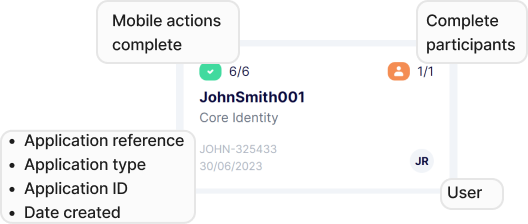
On the overview screen, each application has a card that provides a quick overview of its progress.

&#x20;

<figure><img src="/files/7YTVUY5SRTS8Gxev2Xdj" alt=""><figcaption><p>Application card detail</p></figcaption></figure>

* **Mobile Actions:** The mobile actions that your customers needs to perform.
* **Application Reference:** What the user named the application when it was created. This should be something meaningful, like an internal reference for the client or case that you use on other systems.
* **Application ID:** The application ID is a unique ID that we create. This allows you to quickly find an application by searching for the ID and helps us find an application if you need support.&#x20;
* **Date Created:** The date the application was first created.&#x20;
* **Complete participants:** The total number of participants associated with your application and how many are complete.
* **User:** Each application can have a user associated with it. This helps manage and find applications that are a particular staff member's responsibility. Initially, this will be the user that created the application, but can be updated from that applications page.

***

## View, Search and Filter

Users can view, search, and filter applications.&#x20;

* **View:** Click on a card or row of an application to navigate to the application view.
* **Search**: The application can be searched using the reference, ID and participants’ names.
* **Filter**: The applications can be filtered by allocated user, consultant, created date, application type and whether the application has been archived.

***


---

# Agent Instructions: Querying This Documentation

If you need additional information that is not directly available in this page, you can query the documentation dynamically by asking a question.

Perform an HTTP GET request on the current page URL with the `ask` query parameter:

```
GET https://verify-doc.tiller-verify.com/training-hub/user-guides/applications/managing-applications.md?ask=<question>
```

The question should be specific, self-contained, and written in natural language.
The response will contain a direct answer to the question and relevant excerpts and sources from the documentation.

Use this mechanism when the answer is not explicitly present in the current page, you need clarification or additional context, or you want to retrieve related documentation sections.