> For the complete documentation index, see [llms.txt](https://verify-doc.tiller-verify.com/llms.txt). Markdown versions of documentation pages are available by appending `.md` to page URLs; this page is available as [Markdown](https://verify-doc.tiller-verify.com/training-hub/user-guides/screening/creating-company-check/reviewing-company-check.md).
# Reviewing Company Check
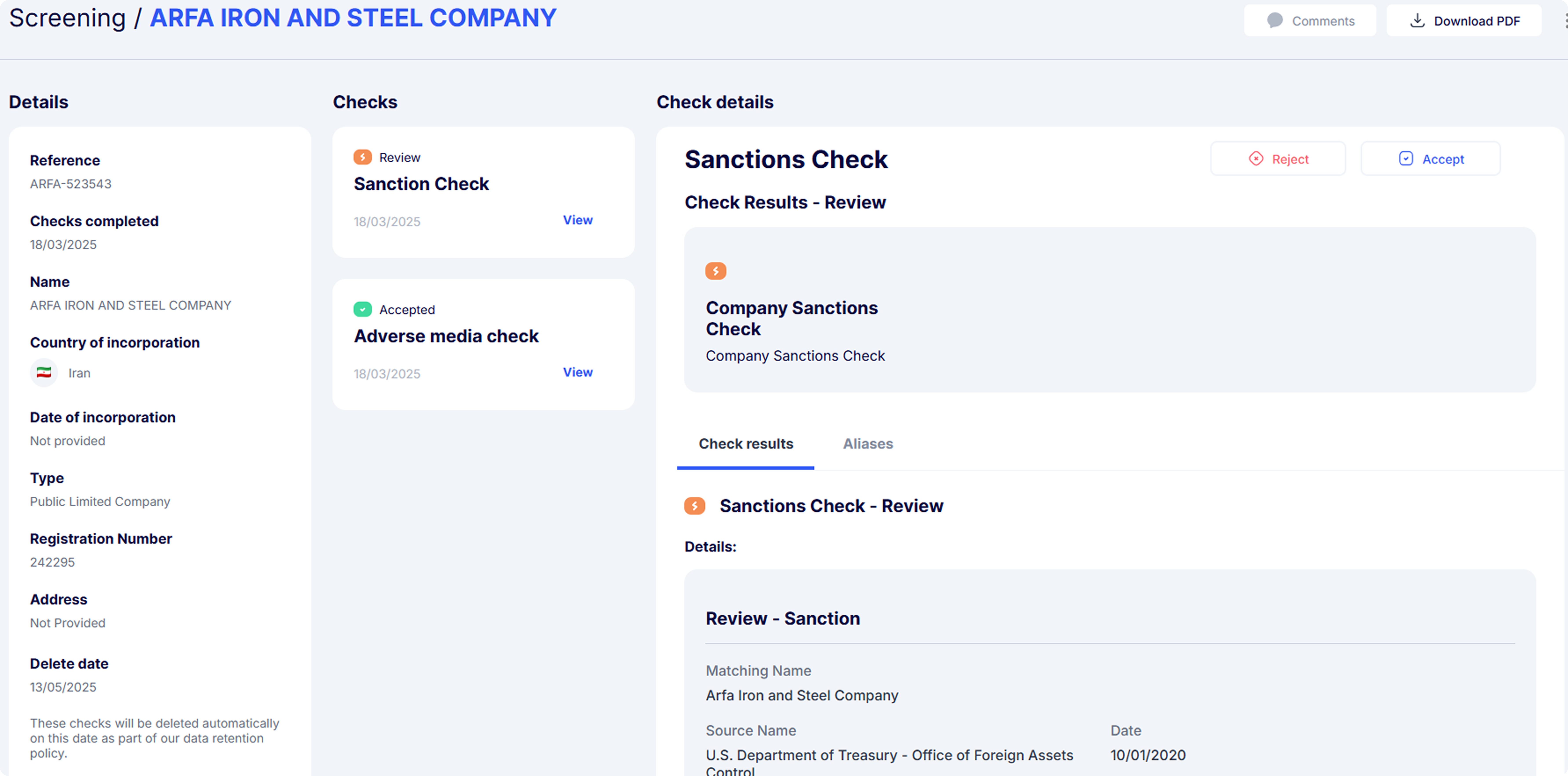
The **"Reviewing Company Check"** page offers a detailed overview of the checks conducted on a company, including the results, and takes action based on those results. For checks marked as 'Reviewed,' you can manually accept or reject the results as part of your business risk appetite. You have the option to download a PDF report summarising all the checks you have performed.
Reviewing company check
## **Details section**
In this section, you will find key information about the company such as a unique reference number that helps in tracking the check and, it also displays the date when the checks were completed, along with the company details and address. Additionally, a Delete Date" is specified, which indicates when the checks will be automatically removed in accordance with the data retention policy.
***
## **Check section**
### **1. Check Type:**
This section lists the different types of checks performed on the company. Currently, you can conduct Sanctions, and Adverse Media checks on companies.
### **2. Result Status:**
* **Review:** Indicates that the check requires further review.
* **Accepted:** Shows that the check has passed without issues.
* **View:** A link to view detailed results of each specific check, allowing the user to dive deeper into any findings.
***
## Check Details
Displays the overall results of the specific check, showing whether the individual check was passed or in review.
**Manual accept/ reject check**
You can manually accept or reject checks that are in the 'review' status. When users choose to manually reject or accept checks, these actions will be stored against the check details. You will be prompted to leave a comment explaining the reason for this decision. This note will be included in the Customer PDF Report for audit purposes.
***
## **Download PDF report:**
Located at the top-right of the screen, this button allows the user to download a comprehensive PDF report of all the checks performed on the company. The PDF includes all the details and results from the checks, making it easy to store, share, or reference later for compliance and audit purposes.
## **Making comments:**
Comments can be made against the company record during their check. It provides a useful way to record actions, notes or useful information.
---
# Agent Instructions
This documentation is published with GitBook. GitBook is the documentation platform designed so that both humans and AI agents can read, navigate, and reason over technical content effectively. Learn more at gitbook.com.
## Querying This Documentation
If you need additional information that is not directly available in this page, you can query the documentation dynamically by asking a question.
Perform an HTTP GET request on the current page URL with the `ask` query parameter, and the optional `goal` query parameter:
```
GET https://verify-doc.tiller-verify.com/training-hub/user-guides/screening/creating-company-check/reviewing-company-check.md?ask=&goal=
```
`ask` is the immediate question: it should be specific, self-contained, and written in natural language.
`goal` is optional and describes the broader end goal you are ultimately trying to accomplish on behalf of the user. GitBook uses it to tailor the answer towards what is most useful for that goal.
The response will contain a direct answer to the question and relevant excerpts and sources from the documentation.
Use this mechanism when the answer is not explicitly present in the current page, you need clarification or additional context, or you want to retrieve related documentation sections.