> For the complete documentation index, see [llms.txt](https://verify-doc.tiller-verify.com/llms.txt). Markdown versions of documentation pages are available by appending `.md` to page URLs; this page is available as [Markdown](https://verify-doc.tiller-verify.com/verify-api/getting-started/welcome-to-the-verify-api.md).
# Welcome to the Verify API
The Verify by Tiller API documentation is a comprehensive guide to the powerful API driving the Know Your Customer (KYC) solution developed by Tiller Technologies Limited. This API is designed to streamline the complex processes of identity verification, risk assessment, and compliance management for regulated and supervised businesses across the globe. Our API enables seamless integration, offering a secure, efficient, and user-friendly platform to meet your organisation's KYC obligations.
The Tiller Verify API is built on HTTP. Our API is RESTful. It has predictable resource URLs. It returns HTTP response codes to indicate status and or errors. It accepts and returns JSON in the HTTP body. You can use your favourite HTTP/REST library for your programming language to use Tiller Verify API.
For more information, please visit [www.tiller-verify.com](http://www.tiller-verify.com).
## Purpose of this API
The Verify by Tiller API provides programmable access to our customer KYC/AML services. It caters to a range of regulated business needs. By leveraging our API, you can integrate our verification process with your application.
Through a simple integration, you can create applications, send invites to customers and receive verification results. Checks include:
* Personal details and address capture
* Identity document verification.
* Biometric face match and liveness check.
* International address verification.
* PEP & sanctions screening.
* Adverse media screening
* Secure proof of address upload.
* Geolocation checks
* Nationality capture
* Place of birth capture
* UK Bank Ownership check (coming soon)
* Source of Funds capture (coming soon)
Tiller will continue to build out additional check and modules.
## The Verification Process
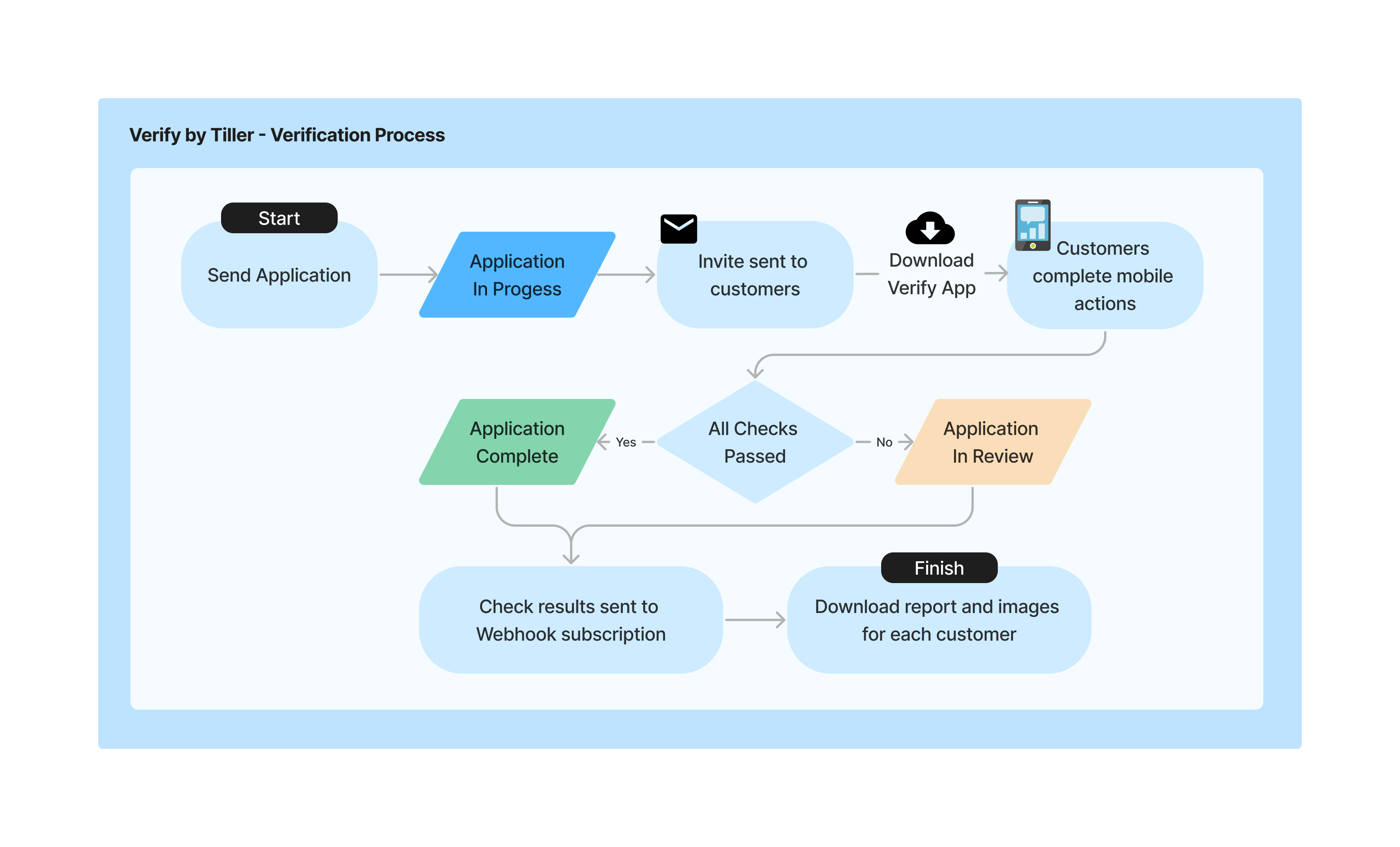
Verify by Tiller streamlines your onboarding process by providing a digital process for completing verification checks through the Verify by Tiller app.
Verification Process Using API
For each application, follow these steps:
1\) Send an application request with one or more individuals.
2\) Customer(s) download the Verify by Tiller app and complete their checks.
3\) Results are sent to your Webhook subscription or can be retrieved.
4\) For each completed customer, download the PDF report, documents and images.
## Global Reach and Security
We understand the importance of global access combined with uncompromised security. Verify by Tiller API offers:
* **Worldwide Accessibility:** Our services are available across various geographical locations, adhering to international compliance standards. For information on our global coverage please contact us at .
* **Data Privacy and Security:** We prioritise the confidentiality and integrity of your data with state-of-the-art security measures. Find out more within the [Data Security](/verify-api/getting-started/data-security.md) section.
## Getting Started
Ready to integrate Verify by Tiller into your workflow? Head to our [Quick Start Guide](/verify-api/getting-started/quick-start-guide.md) for step-by-step instructions on using our API.
We are excited to partner with you and look forward to supporting your business's KYC needs. Should you have any questions or require assistance, our support team is available to ensure a smooth integration experience.
---
# Agent Instructions
This documentation is published with GitBook. GitBook is the documentation platform designed so that both humans and AI agents can read, navigate, and reason over technical content effectively. Learn more at gitbook.com.
## Querying This Documentation
If you need additional information that is not directly available in this page, you can query the documentation by asking a question.
Perform an HTTP GET request on the following URL with the `ask` and `goal` query parameters:
```
GET https://verify-doc.tiller-verify.com/verify-api/getting-started/welcome-to-the-verify-api.md?ask=&goal=
```
`ask` is the immediate question: it should be specific, self-contained, and written in natural language.
`goal` is what the user is ultimately trying to achieve, the reason they need the answer. Sharing it helps GitBook give you a better, more relevant answer. A goal is most helpful when it describes the outcome the user wants rather than restating the question. For example, with `ask=how do I create an API token`, a goal like `automate deployments from our CI pipeline` lets GitBook tailor the answer to that use case.
The response will contain a direct answer to the question and relevant excerpts and sources from the documentation.
Use this mechanism when the answer is not explicitly present in the current page, you need clarification or additional context, or you want to retrieve related documentation sections.